上两节内容我们讲解了在Testbench中应用最广泛的$display函数和$monitor过程,还有其他函数虽然应用较少,但如果能合理使用这些函数在比较复杂的设计中可以简化testbench的编写,仿真中的错误的定位会有很大的帮助,下面我们就来介绍这些函数的使用。
1.数学函数
在数学运算的建模中,充分利用仿真库中提供的数学函数,为行为建模和仿真提供了方便。
注意:这些函数只能用来仿真,不能综合。
| function
函数 |
Description | 描述 |
| $ln(x) | Natural logarithm log(x) | 自然对数In(x) |
| $log10(x) | Decimal Logarithm log10(x) | 10为底的对数 |
| exp(x) | Exponential of x (ex) where e=2.718281828… | 自然指数,e=2.718281828… |
| sqrt(x) | Square root of x | 平方根 |
| $pow(x, y) | xy | X 的y次幂 |
| $floor(x) | Floor (x) | 求底函数 |
| $ceil(x) | Ceiling( x) | 求顶函数 |
| $sin(x) | Sine of x where x is in radians | 正弦函数 |
| $cos(x) | Cosine of x where x is in radians | 余弦函数 |
| $tan(x) | Tangent of x where x is in radians | 正切函数 |
| $asin(x) | Arc-Sine of x | 反正弦函数 |
| $acos(x) | Arc-Cosine of x | 反余弦函数 |
| $atan(x) | Arc-tangent of x | 反正切函数 |
| $atan2(x, y) | Arc-tangent of (x/y) | x/y的反正切 |
| $hypot(x, y) | Hypotenuse of x and y : sqrt(x2 + y2) | 直角三角形斜边函数 |
| $sinh(x) | Hyperbolic Sine of x | 双曲正弦函数 |
| $cosh(x) | Hyperbolic-Cosine of x | 双曲余弦函数 |
| $tanh(x) | Hyperbolic-Tangent of x | 双曲正切函数 |
| $asinh(x) | Arc-hyperbolic Sine of x | 反双曲正弦函数 |
| $acosh(x) | Arc-hyperbolic Cosine of x | 反双曲余弦函数 |
| $atanh(x) | Arc-hyperbolic tangent of x | 反双曲正切函数 |
$ceil(x) 函数返回实数X最大的整数部分,如:x=2.33, 则$ceil(x)=3; x=2.99, $ceil(x)=3;
$floor(x)函数返回实数x的最小整数部分,如:x=2.33, 则$floor(x)=2; x=2.99, $floor(x)=2;
其它函数数学意义比较明确,这里不再累述。
例:
`timescale 1ns / 1ps


module test_bench(
    );

real x, y;
initial
begin
    x = 1000;
    $display("$log10(%0.3f) = %0.3f", x, $log10(x));

    x = 1;
    $display("$ln(%0.3f) = %0.3f", x, $ln(x));

    x = 2;
    $display("$exp(%0.3f) = %0.3f", x, $exp(x));

    x = 16;
    $display("$sqrt(%0.3f) = %0.3f", x, $sqrt(x));

    x = 4;
    y = 3;
    $display("$pow(%0.3f, %0.3f) = %0.3f", x, y, $pow(x,y));

    x = 3.542;
    $display("$floor(%0.3f) = %0.3f", x, $floor(x));

    x = 13.2548;
    $display("$ceil(%0.3f) = %0.3f", x, $ceil(x));

    x = 30 * 3.1415926/ 180;
    $display("$sin(%0.3f) = %0.3f", x, $sin(x));

    x = 45 * 3.1415926/ 180;
    $display("$cos(%0.3f) = %0.3f", x, $cos(x));

    x = 45 * 3.1415926/ 180;
    $display("$tan(%0.3f) = %0.3f", x, $tan(x));

    x = 0.5;
    $display("$asin(%0.5f) = %0.5f rad, %0.5f deg", x, $asin(x),$asin(x)*7.0/22.0 * 180);

    x = 0;
    $display("$acos(%0.5f) = %0.5f rad, %0.5f deg", x, $acos(x),$acos(x)*7.0/22.0 * 180);

    x = 1;
    $display("$atan(%0.5f) = %0.5f rad, %0.5f deg", x, $atan(x),$atan(x)*7.0/22.0 * 180);

end


endmodule
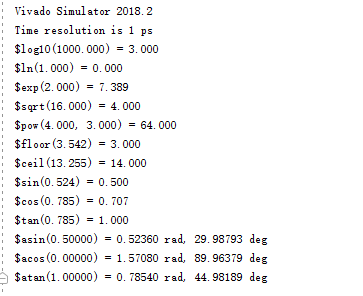
仿真结果如下:
数学函数在Verilog程序设计中的作用:
- 行为建模,在实体模块成功开发之前利用数学函数可以评估系统的功能。
- 为设计实体提供输入,特别是采用定点或浮点小数运算时需要提供各种形式的输入,在基于FPGA的DSP开发中应用很广泛。
- 结果对比;实体程序实现的数学算法,利用数学函数的结果与实体程序的输出做对比,可以评估结果是否正确,以及结果的精度是否满足要求。
以上的函数将会在后续课程中结合具体实例进行讲解。
还有一个函数$clog2也被广泛使用,下面将详细讲解该函数的使用。
2. $clog2函数
该函数可以认为是由两个函数构成,$log2 (以2为底的log函数)+ $ceil ()。 即先求$log2, 再求$ceil, 也可以可以理解为 $ceil($log2(x))。例如: x=6, 则y=$clog2(x)的结果y=3。这个函数对于求位宽非常有用。注意:$clog2(x)函数是可综合的函数。$clog2(x)函数在仿真时,x可以是reg,wire,integer 变量或parameter,localparam 声明的参数。而综合时只支持parameter或localparam 声明的参数。
例1: $clog2(x) 函数测试
程序如下:
`timescale 1 ns /1 ps
module tb ( );

wire [7:0] a = 253;
reg  [3:0] b;

initial
begin
    b = 0;
    #10 b = $clog2(a);
    #10;
end
endmodule
仿真结果如图1所示,从仿真结果看变量a = 253, $clog2(a)的结果为8。可见如果要表达最大值为253的数值范围,最低需要8位位宽的变量。
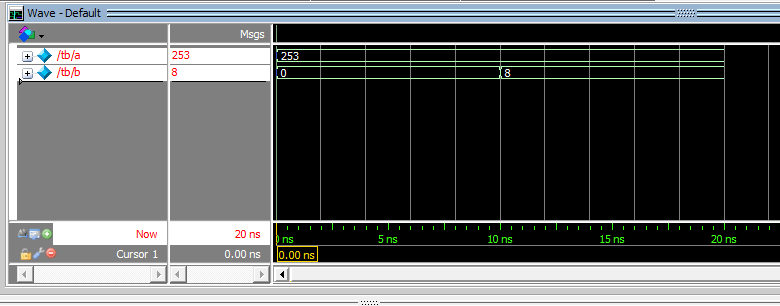
图1
修改上面的测试程序,添加实体模块,继续测试在实体模块中$clog2的行为,程序如下:
(1)实体模块程序
module test_clog
(
    input  [7:0] addr,
    output [7:0] data
);

assign data = $clog2(addr);
endmodule
(2) 仿真激励程序
`timescale  1 ns /1 ps
module tb
();

wire  [7:0]  a = 253;
wire  [7:0]  data;
reg   [7:0]  addr;
reg   [3:0]  b;

initial  begin
    b = 0;
    addr = 0;
    #10 b = $clog2(a);
    addr = 100;
    #10;
end

test_clog  test_clog_inst
(
    .addr(addr),
    .data(data)
);
endmodule
仿真结果如图2:
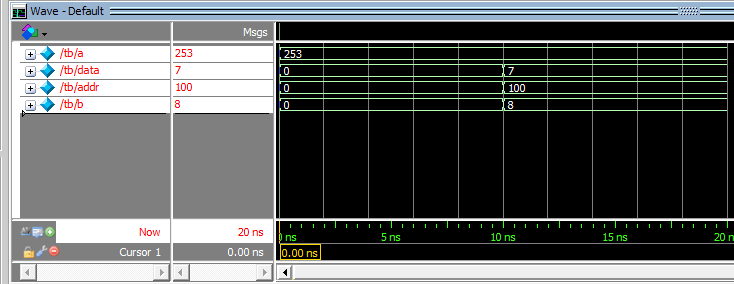
图2
从图2的仿真结果可以看出,wire,reg,integer类型变量在仿真时,无论在testbench 模块还是实体程序中$clog2函数都可以正确使用。但在实体模块中,$clog2是可综合的系统调用,但仅限于对常数求解,因此如果将上例中的实体模块进行综合,会得到图3中的错误提示。
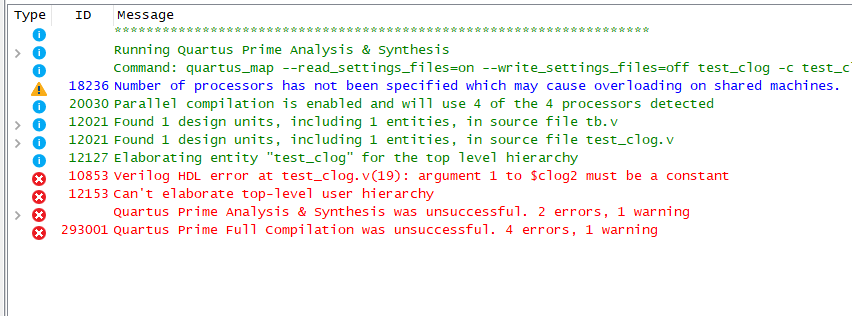
图3
出现图3中的这种错误的原因是实体module里对$clog2(x)进行变量求解造成的,虽然此时变量值也是整数。但在利用参数(parameter, localparam)或宏(`define)声明的常量时,在实体模块中是可以综合的,特别是在IPcore 设计中对于输入、输出位宽,可变宽度、可变深度的存储器的数据位宽,地址位宽的参数化设计是非常有效而且是可行的办法。
例2: 设计一个容量为参数化的RAM,用$clog2函数计算地址的宽度
(1)实体程序如下:
`timescale  1 ns /1 ps

module test_clog2
#(parameter DEEP = 256)
(
    input    [$clog2(DEEP)-1:0]  addr,
    output   [7:0]               data
);
reg  [7:0] ram [0:DEEP-1];   //定义ram, 位宽为8位, 深度为DEEP。

assign data = ram[addr];    // 根据地址读取ram中的值。
integer i;
initial begin                        //ram 初始化
    for(i = 0; i < DEEP; i = i + 1)
        ram[ i ] = i + 1;
end

endmodule
上面程序中 语句“input [$clog2(DEEP)-1:0] addr,”中用到了$clog2函数求地址宽度。参数化传递在求地址端口位宽,意义非常明显,比如DEEP等于100,则计算出$clog2(DEEP)=7, 也就是需要7位地址才能完成整个存储器的寻址。
(2)仿真激励程序如下:
`timescale  1 ns /1 ps
module tb  ();
parameter DEEP = 256;

wire  [7:0]  data;
reg   [$clog2(DEEP)-1:0]  addr;

initial  begin
    addr = 0;
    #10
    for(addr = 0;addr <= DEEP; addr = addr + 1)
        #10;
    #10;
    $stop;
end


test_clog2
#(.DEEP(DEEP) )
test_clog_inst
(
    .addr(addr),
    .data(data)
);

endmodule
(3)仿真波形如图4,5

图4

图5
从图4,5 的仿真结果看,的确将实体模块中的RAM内容正确读出。在图5中我们还注意到一个细节,当我们需要读取256个数据时,由于addr既是RAM的地址,同时也是for循环的判断条件,因此在终止for循环时,地址比给定的边界值大1(如256)才能满足条件。这不是我们希望的结果,因为真实例化的RAM单元地址可能不存在(0 — 255),虽然在本程序中影响不大。分析一下,下面程序的运行结果,
`timescale  1 ns /1 ps
module tb ();
parameter DEEP = 100;

wire  [7:0]  data;
reg   [7:0]  addr;

initial
begin
    addr = 0;
    #10
    for(addr = 0; addr <= 255; addr = addr + 1)
        #10;
    #10;
    $stop;
end

test_clog2
#(.DEEP(DEEP))
test_clog_inst
(
    .addr(addr),
    .data(data)
);
endmodule
先看看在边界时的仿真结果,如图6

图6
从图6可以看出,RAM的内容读取没有问题,但程序在地址addr达到255后并没有停下来,而是继续运行。为什么会出现这个原因呢?
可见问题出在for循环的边界判断上。对于条件addr<=255,实际上当addr=256时才满足终止条件,而addr的位宽是8位的(“reg [7:0] addr;”),因此addr的值永远不可能达到8位,因此才会出现上面的结果。解决方案如下:
- 调整addr的位宽,由8位变成9位,如修改addr的声明为”reg [8:0] addr”,但这并不是一个好的方案,因为增加位宽后,应该评估对其它程序的影响。
- 比较好的方案引入一个临时整型变量i,由i作为for循环的控制变量,在for循环体内修改addr的值, 修改后程序如下,
`timescale  1 ns /1 ps
module tb ();

parameter DEEP = 256;
wire  [7:0]  data;
reg   [7:0]  addr;
integer      i;
initial
begin
    addr = 0;
    #10
    for(i = 0; i <= 255; i = i + 1) begin
        #10  addr = addr + 1;
    end
    #10;
    $stop;
end

test_clog2
#(.DEEP(DEEP))
test_clog2_inst
(
    .addr(addr),
    .data(data)
);

endmodule

图7
从图7的仿真结果可以看出,经过修改后for循环可以按照预期设定运行。
由于clog2函数Verilog代码可以由函数(function)实现,参考代码如下:
function integer clog2(input integer depth);
begin
    depth = (depth == 0) ? 0 : depth - 1;
    for(clog2 = 0; depth > 0; clog2 = clog2 + 1)
        depth = depth >> 1;
end
endfunction
仿真程序如下:
`timescale 1ns / 1ps

module test_bench(

    );

function integer clog2(input integer depth);
begin
    depth = (depth == 0) ? 0 : depth - 1;
    for(clog2= 0; depth > 0; clog2= clog2+ 1)
        depth = depth >> 1;
end
endfunction

integer i;
initial
begin
    for(i = 0; i < 34; i = i + 1)
    begin
        $display(" clog2(%0d) = %d",    i, clog2(i));
        $display("$clog2(%0d) = %d \n", i, $clog2(i));
    end

    $stop;
end

endmodule
仿真结果如下:
Vivado Simulator 2018.2
Time resolution is 1 ps
 clog2(0) =           0
$clog2(0) =           0

 clog2(1) =           0
$clog2(1) =           0

 clog2(2) =           1
$clog2(2) =           1

 clog2(3) =           2
$clog2(3) =           2

 clog2(4) =           2
$clog2(4) =           2

 clog2(5) =           3
$clog2(5) =           3

 clog2(6) =           3
$clog2(6) =           3

 clog2(7) =           3
$clog2(7) =           3

 clog2(8) =           3
$clog2(8) =           3

 clog2(9) =           4
$clog2(9) =           4

 clog2(10) =           4
$clog2(10) =           4

 clog2(11) =           4
$clog2(11) =           4

 clog2(12) =           4
$clog2(12) =           4

 clog2(13) =           4
$clog2(13) =           4

 clog2(14) =           4
$clog2(14) =           4

 clog2(15) =           4
$clog2(15) =           4

 clog2(16) =           4
$clog2(16) =           4

 clog2(17) =           5
$clog2(17) =           5

 clog2(18) =           5
$clog2(18) =           5

 clog2(19) =           5
$clog2(19) =           5

 clog2(20) =           5
$clog2(20) =           5

 clog2(21) =           5
$clog2(21) =           5

 clog2(22) =           5
$clog2(22) =           5

 clog2(23) =           5
$clog2(23) =           5

 clog2(24) =           5
$clog2(24) =           5

 clog2(25) =           5
$clog2(25) =           5

 clog2(26) =           5
$clog2(26) =           5

 clog2(27) =           5
$clog2(27) =           5

 clog2(28) =           5
$clog2(28) =           5

 clog2(29) =           5
$clog2(29) =           5

 clog2(30) =           5
$clog2(30) =           5

 clog2(31) =           5
$clog2(31) =           5

 clog2(32) =           5
$clog2(32) =           5

 clog2(33) =           6
$clog2(33) =           6
从上面的仿真结果可以看出,系统提供的$clog2函数对于输入参数为1时,$clog2函数结果为0,即 20= 1 。但是这个结果不适合计算总线宽度。所以下文中给出的自定义函数bus_width函数修正了这一错误,当输入参数为1时,bus_width(1) = 1 。
可以在module内用函数生成,module例化后可以在其它模块中调用。但该程序是可综合的变量输入的clog2函数,但不能做系统调用。注意输入参数depth要求大于0。至于如何写系统调用函数,并能在系统中调用,后续课程会讲解。
function integer bus_width(input integer depth);
begin
    if(depth[31:1] != 0)
    begin
        depth =  depth - 1;
        for(bus_width= 0; depth > 0; bus_width= bus_width+ 1)
            depth = depth >> 1;
    end
    else bus_width= depth;
end
endfunction
实验课:设计一段程序在硬件开发板上(pra006或prx100D)观察RAM的实现,以及RAM初始化的实现。要求分别在Quartus和Vivado下实现。
对应视频: