在对FPGA进行约束时,分为物理约束和时序约束两种, Xilinx的Vivado工具使用XDC文件进行约束, 在XDC文件中包含了物理约束和时序约束的内容。而Quartus下采用两种文件分别实现物理约束和时序约束,其中QSF文件用来实现物理约束,SDC文件用来实现时序约束。在利用Quartus生成工程时,缺省是不包含SDC文件的,因此在使用SDC文件前需要先利用工具生成然后添加到工程中的。
1. 在Quatus下生成SDC文件
在生成SDC文件之前,可以先查看系统的时钟树信息。由于时钟经过PLL生成时钟树,输入时钟与输出时钟的约束关系在PLL生成的时候已经确定,因此这里只要添加输入时钟的约束即可。这里以串行高速通信工程为例,结合具体工程进行介绍。打开工程,在Quartus –>task–>Timing Anlyzer的窗口中可以查看时钟树的信息,如图1所示。
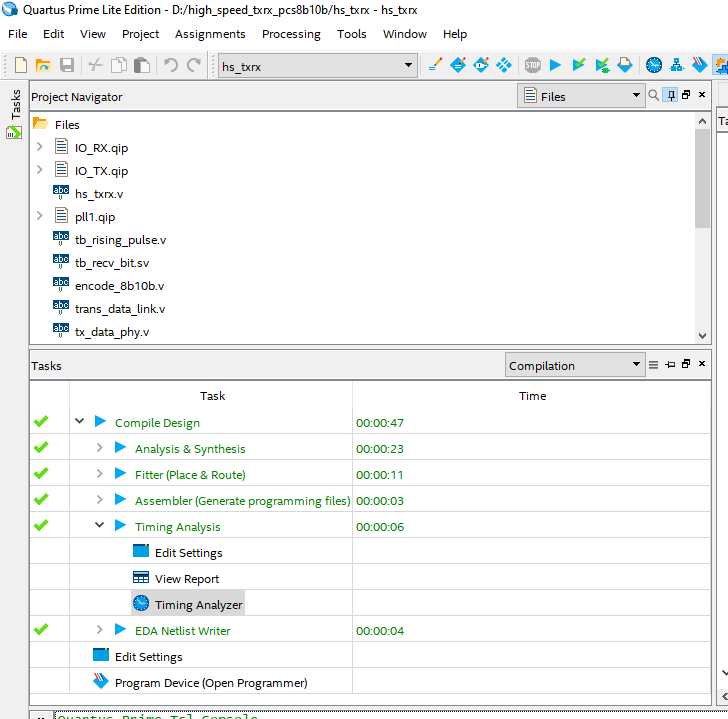
图1
在图1中双击Timing Analyzer, 弹出图2对话框,
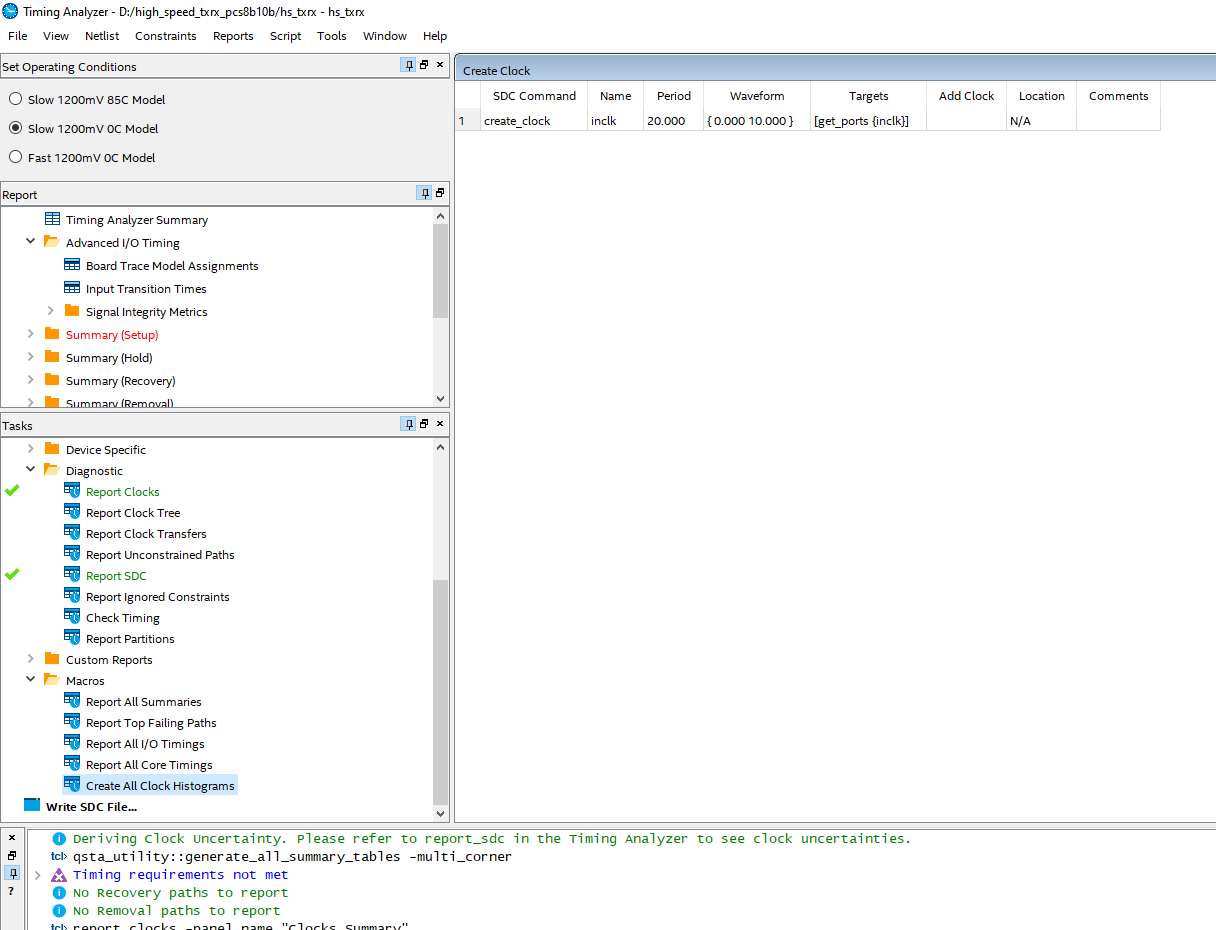
图2
图2中在 Tasks的底部有Write SDC File。双击,弹出图3对话框。
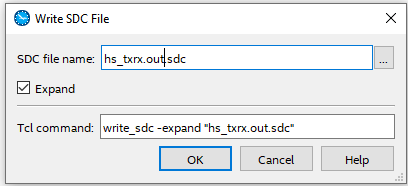
图3
图3对话框给出了SDC文件的默认名称,可以修改该名称,如修改成hs_txrx.sdc, 点击右边的”…”按钮可以为生成的SDC 文件选择合适的目录,对话框中Expand选项默认要选上。 如果不选Expand, 点击OK后将创建一个空的SDC文件,之后可以通过图2中的对话框找到各个选项逐一添加(如create_clock)。选择了Expand选项,在创建SDC文件时将自动将通过工程中使用的时钟情况进行推create_clock)断,并生成相应的时钟(clock)信息。这个对话框只是给我们提供了一个图形化输入方法,真正起作用的是图3中的Tcl 命令(Tcl command), write_sdc -expand “hs_txrx_out.sdc”.
如果能记住这些Tcl command, 也可以直接在Quartus 的Tcl 命令窗口输入命令实现。修改文件名如图4,点击OK生成SDC文件。
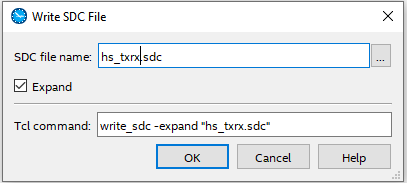
图4
2.初识SDC文件
(1)在图4窗口中如果没有选择Expand, 生成的SDC文件如下:
## Generated SDC file “hs_txrx.sdc”
## Copyright (C) 2018 Intel Corporation. All rights reserved.
## Your use of Intel Corporation’s design tools, logic functions
## and other software and tools, and its AMPP partner logic
## functions, and any output files from any of the foregoing
## (including device programming or simulation files), and any
## associated documentation or information are expressly subject
## to the terms and conditions of the Intel Program License
## Subscription Agreement, the Intel Quartus Prime License Agreement,
## the Intel FPGA IP License Agreement, or other applicable license
## agreement, including, without limitation, that your use is for
## the sole purpose of programming logic devices manufactured by
## Intel and sold by Intel or its authorized distributors. Please
## refer to the applicable agreement for further details.
## VENDOR “Altera”
## PROGRAM “Quartus Prime”
## VERSION “Version 18.0.0 Build 614 04/24/2018 SJ Lite Edition”
## DATE “Sat Jan 01 16:20:07 2022”
##
## DEVICE “10CL006YE144C8G”
##
#**************************************************************
# Time Information
#**************************************************************
set_time_format -unit ns -decimal_places 3
#**************************************************************
# Create Clock
#**************************************************************
derive_pll_clocks -create_base_clocks
#**************************************************************
# Create Generated Clock
#**************************************************************
#**************************************************************
# Set Clock Latency
#**************************************************************
#**************************************************************
# Set Clock Uncertainty
#**************************************************************
derive_clock_uncertainty
#**************************************************************
# Set Input Delay
#**************************************************************
#**************************************************************
# Set Output Delay
#**************************************************************
#**************************************************************
# Set Clock Groups
#**************************************************************
#**************************************************************
# Set False Path
#**************************************************************
#**************************************************************
# Set Multicycle Path
#**************************************************************
#**************************************************************
# Set Maximum Delay
#**************************************************************
#**************************************************************
# Set Minimum Delay
#**************************************************************
#**************************************************************
# Set Input Transition
#**************************************************************
可见该SDC文件,只创建了一个框架,没用实质性内容。
(2)在图4中选择了Expand选项,创建的SDC文件如下:
## Generated SDC file “hs_txrx.sdc”
## Copyright (C) 2018 Intel Corporation. All rights reserved.
## Your use of Intel Corporation’s design tools, logic functions
## and other software and tools, and its AMPP partner logic
## functions, and any output files from any of the foregoing
## (including device programming or simulation files), and any
## associated documentation or information are expressly subject
## to the terms and conditions of the Intel Program License
## Subscription Agreement, the Intel Quartus Prime License Agreement,
## the Intel FPGA IP License Agreement, or other applicable license
## agreement, including, without limitation, that your use is for
## the sole purpose of programming logic devices manufactured by
## Intel and sold by Intel or its authorized distributors. Please
## refer to the applicable agreement for further details.
## VENDOR “Altera”
## PROGRAM “Quartus Prime”
## VERSION “Version 18.0.0 Build 614 04/24/2018 SJ Lite Edition”
## DATE “Sat Jan 01 16:23:28 2022”
##
## DEVICE “10CL006YE144C8G”
##
#**************************************************************
# Time Information
#**************************************************************
set_time_format -unit ns -decimal_places 3
#**************************************************************
# Create Clock
#**************************************************************
create_clock -name {inclk} -period 20.000 -waveform { 0.000 10.000 } [get_ports {inclk}]
#**************************************************************
# Create Generated Clock
#**************************************************************
create_generated_clock -name {pll1_inst|altpll_component|auto_generated|pll1|clk[0]} -source [get_pins {pll1_inst|altpll_component|auto_generated|pll1|inclk[0]}] -duty_cycle 50/1 -multiply_by 2 -master_clock {inclk} [get_pins {pll1_inst|altpll_component|auto_generated|pll1|clk[0]}]
create_generated_clock -name {pll1_inst|altpll_component|auto_generated|pll1|clk[1]} -source [get_pins {pll1_inst|altpll_component|auto_generated|pll1|inclk[0]}] -duty_cycle 50/1 -multiply_by 8 -phase 180.000 -master_clock {inclk} [get_pins {pll1_inst|altpll_component|auto_generated|pll1|clk[1]}]
#**************************************************************
# Set Clock Latency
#**************************************************************
#**************************************************************
# Set Clock Uncertainty
#**************************************************************
set_clock_uncertainty -rise_from [get_clocks {pll1_inst|altpll_component|auto_generated|pll1|clk[0]}] -rise_to [get_clocks {pll1_inst|altpll_component|auto_generated|pll1|clk[0]}] 0.020
set_clock_uncertainty -rise_from [get_clocks {pll1_inst|altpll_component|auto_generated|pll1|clk[0]}] -fall_to [get_clocks {pll1_inst|altpll_component|auto_generated|pll1|clk[0]}] 0.020
set_clock_uncertainty -fall_from [get_clocks {pll1_inst|altpll_component|auto_generated|pll1|clk[0]}] -rise_to [get_clocks {pll1_inst|altpll_component|auto_generated|pll1|clk[0]}] 0.020
set_clock_uncertainty -fall_from [get_clocks {pll1_inst|altpll_component|auto_generated|pll1|clk[0]}] -fall_to [get_clocks {pll1_inst|altpll_component|auto_generated|pll1|clk[0]}] 0.020
set_clock_uncertainty -rise_from [get_clocks {pll1_inst|altpll_component|auto_generated|pll1|clk[1]}] -rise_to [get_clocks {pll1_inst|altpll_component|auto_generated|pll1|clk[0]}] 0.020
set_clock_uncertainty -rise_from [get_clocks {pll1_inst|altpll_component|auto_generated|pll1|clk[1]}] -fall_to [get_clocks {pll1_inst|altpll_component|auto_generated|pll1|clk[0]}] 0.020
set_clock_uncertainty -rise_from [get_clocks {pll1_inst|altpll_component|auto_generated|pll1|clk[1]}] -rise_to [get_clocks {pll1_inst|altpll_component|auto_generated|pll1|clk[1]}] 0.020
set_clock_uncertainty -rise_from [get_clocks {pll1_inst|altpll_component|auto_generated|pll1|clk[1]}] -fall_to [get_clocks {pll1_inst|altpll_component|auto_generated|pll1|clk[1]}] 0.020
set_clock_uncertainty -fall_from [get_clocks {pll1_inst|altpll_component|auto_generated|pll1|clk[1]}] -rise_to [get_clocks {pll1_inst|altpll_component|auto_generated|pll1|clk[0]}] 0.020
set_clock_uncertainty -fall_from [get_clocks {pll1_inst|altpll_component|auto_generated|pll1|clk[1]}] -fall_to [get_clocks {pll1_inst|altpll_component|auto_generated|pll1|clk[0]}] 0.020
set_clock_uncertainty -fall_from [get_clocks {pll1_inst|altpll_component|auto_generated|pll1|clk[1]}] -rise_to [get_clocks {pll1_inst|altpll_component|auto_generated|pll1|clk[1]}] 0.020
set_clock_uncertainty -fall_from [get_clocks {pll1_inst|altpll_component|auto_generated|pll1|clk[1]}] -fall_to [get_clocks {pll1_inst|altpll_component|auto_generated|pll1|clk[1]}] 0.020
#**************************************************************
# Set Input Delay
#**************************************************************
#**************************************************************
# Set Output Delay
#**************************************************************
#**************************************************************
# Set Clock Groups
#**************************************************************
#**************************************************************
# Set False Path
#**************************************************************
#**************************************************************
# Set Multicycle Path
#**************************************************************
#**************************************************************
# Set Maximum Delay
#**************************************************************
#**************************************************************
# Set Minimum Delay
#**************************************************************
#**************************************************************
# Set Input Transition
#**************************************************************
可见该SDC文件实现3个内容, create_clock ,create_generated_clock,set_clock_uncertainty 三项内容。如果初学者对于时钟的创建及时钟的使用还不熟悉,我们可以默认以上创建。
3.SDC文件进阶
SDC 文件初步分析:
(1)#后面的文字为注释语句,Quartus工具不解析注释语句的内容
(2)set_time_format -unit ns -decimal_places 3
该句的含义是设置时间格式为:
-unit ns 时间单位:ns, 合法的单位为ps, ns, us, ms。
-decimal_places 3 小数部分的占位符为3位。系统默认的为3位占位符,可以利用该选项修改默认值。
例: 创建两个时钟:
set_time_format -unit ns -decimal_places 3
create_clock -period 8.000 clk1,
set_time_format -unit ps -decimal_places 0
  create_clock -period 5000 clk2
注:在Quartus中的最小时间精度为ps, 因此任何超过该精度的值将会被截取到PS的精度为止。如:
set_time_format -unit ns -decimal_places 4
create_clock -period 8.0001 clk1,
 实际的效果和下面的语句等效。
set_time_format -unit ns -decimal_places 3
create_clock -period 8.000 clk1,
(3) 创建时钟
- create_clock -name {inclk} -period 20.000 -waveform { 0.000 10.000 } [get_ports {inclk}] 由于上面制定了单位为ns, 因此后面如果没有重新指定,所有的时间单位都以ns为计算单位。
- 创建时钟一般由4个部分组成, 名称-name 后面{name1}给出名称, 这里为inclk, 当然也可以使用别的名称
- -period 指定时钟周期 20.000 (20ns) (3) -waveform 指定波形或占空比 ,-waveform { 0.000 10.000 }是指上升沿在0.000,下降沿在10.000的方波,如果占空比不同,如高电平40%, 低电平为60%可以按如下格式书写: -waveform { 0.000 8.000 },由于周期为20 ns, 因此占空比为40%。
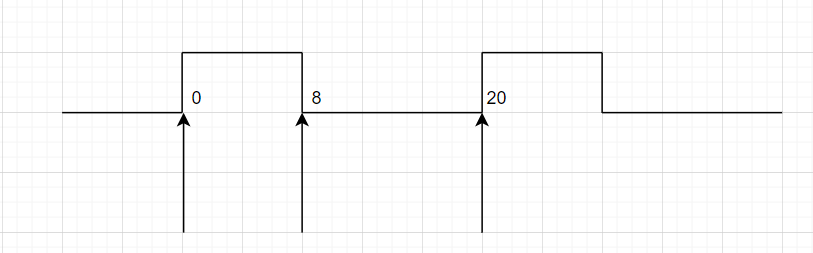 图5
图5 - 由[…]部分指定管脚, get_ports{inclk}, 最终与顶层文件的输入名称(如Verilog),QSF的管脚约束一起决定了外部输入时钟及时钟特性。
(4)创建生成时钟
- 一般外部时钟经过FPGA内部的PLL后会生成多个时钟,在SDC文件中要创建多个生成时钟,创建生成时钟由于与项目的目录,PLL设定有有关系,因此看起比较冗长,不易读懂,将本工程中的利用 write_sdc -Expand “hs_txrx.sdc” 创建的生成时钟分析如下: 下面分析clk_100M的时钟生成的Tcl组合命令。
- create_generated_clock -name {pll1_inst|altpll_component|auto_generated|pll1|clk[0]} 创建生成时钟,时钟的名称为pll1_inst|altpll_component|auto_generated|pll1|clk[0], 这是从PLL中导出的名称,将来所有与该时钟相关的信息都使用该名称,.
由于名字构成复杂,使用及其不方便,因此可以使用一个简单的名字如clk_100M来替代.
create_generated_clock -name {clk_100M}
- -source [get_pins {pll1_inst|altpll_component|auto_generated|pll1|inclk[0]}] 利用-source找到PLL的输入时钟管脚(注意是PLL输入),这个名称是找到时钟源的节点,因此不能使用简单的名称替代。
- -duty_cycle 50/1 -multiply_by 2 -master_clock {inclk} -duty-cycle 50指明占空比为50% /1 -multiply_by 2 表示时钟从输入端(source)到生成时钟的关系是除以1乘以2,
- -master_clock inclk, 表示由主时钟inclk生成。
- [get_pins {pll1_inst|altpll_component|auto_generated|pll1|clk[0]}] 最后指出该时钟是PLL1的clk[0]输出的。
- 400M时钟与100M时钟的分析几乎一样,只是把-name 选项改为clk_400M ,其它的这里不在累述。
- create_generated_clock -name {clk_400M}
- -source [get_pins {pll1_inst|altpll_component|auto_generated|pll1|inclk[0]}]
- -duty_cycle 50
- /1 -multiply_by 8 -phase 180.000
- -master_clock {inclk}
- [get_pins {pll1_inst|altpll_component|auto_generated|pll1|clk[1]}]。
(5) set_clock_uncertainty
uncertainty 是时钟延迟(latency)、时钟偏斜(skew)、时钟抖动(Jitter)的综合效果。
- 时钟延迟
在多生成时钟域内,如果这些生成的时钟是同源的(即由同一个PLL生成,PLL的输入时钟也相同),输出存在整数倍关系,一般可以认为它们为同步时钟,但这些同步时钟由各自的时钟分布,在整个时钟的分布上可能存在不同的延时。这些延时构成 uncertainty的一个部分。如clk_100M,和clk_400M之间的延时。
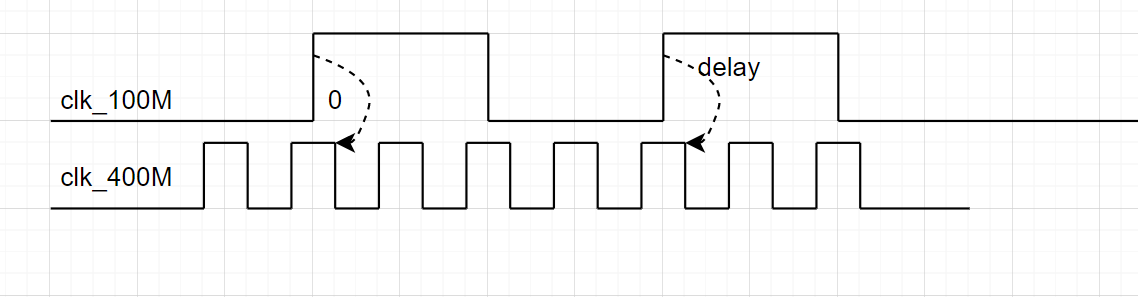
图6
- 时钟偏斜(SKEW)
时钟偏斜,有的翻译中也称为时钟扭曲,是指在同一个时钟下,时钟由于传播延时到达不同触发器的时钟端的时间上的差异性。
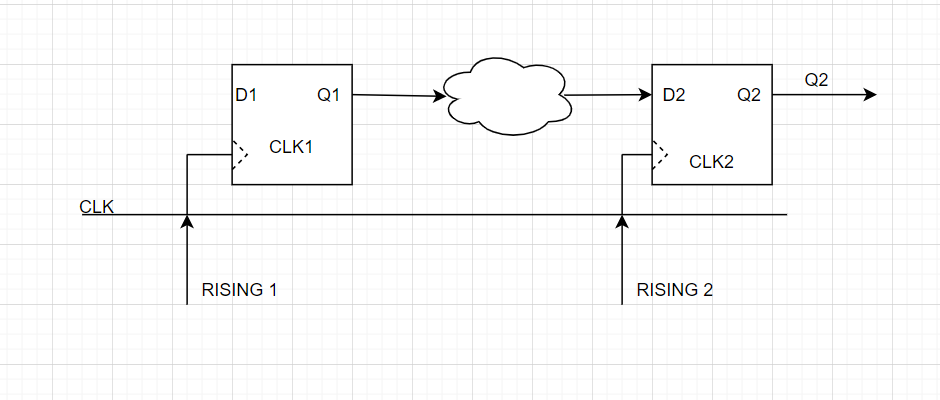
图7
在同步时序电路中,在进行数据寄存时总是认为所有的触发器的有效边沿同时到达的,即TRISING1=TRISING2 ,实际在真实的FPGA器件中,有效边沿同时到达几乎是不可能的, 因此有TSKEW
TSKEW=TRISING1-TRISING2 ; 时钟偏斜也构成uncertainty的一个部分.
- 时钟抖动(Jitter)
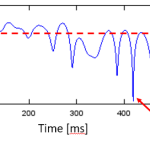
由于PLL是压控震荡器的输出,同时又经过反馈不断调节输出以追随输入频率,因此PLL的时钟输出不可能保持频率和相位完全不变。在PLL的输出端会有抖动现象,如图8所示。
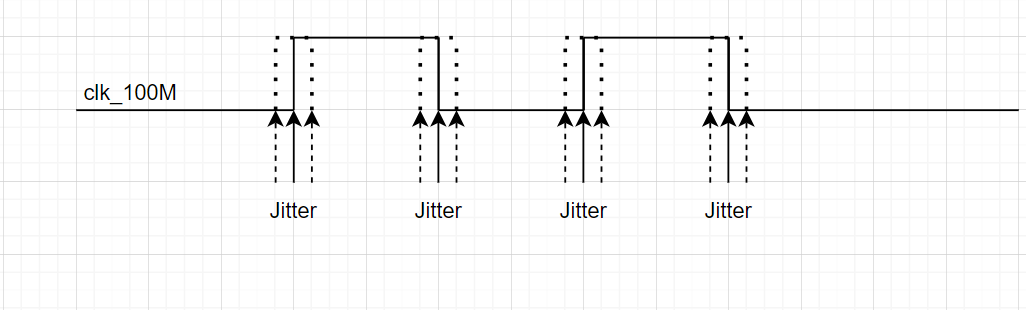
图8
- 时钟uncertainty的设置
set_clock_uncertainty -rise_from [get_clocks {clk_100M}] -rise_to [get_clocks {clk_100M}] 0.020
set_clock_uncertainty -rise_from [get_clocks {clk_100M}] -fall_to [get_clocks {clk_100M}] 0.020
set_clock_uncertainty -fall_from [get_clocks {clk_100M}] -rise_to [get_clocks {clk_100M}] 0.020
set_clock_uncertainty -fall_from [get_clocks {clk_100M}] -fall_to [get_clocks {clk_100M}] 0.020
set_clock_uncertainty -rise_from [get_clocks {clk_400M}] -rise_to [get_clocks {clk_100M}] 0.020
set_clock_uncertainty -rise_from [get_clocks {clk_400M}] -fall_to [get_clocks {clk_100M}] 0.020
set_clock_uncertainty -rise_from [get_clocks {clk_400M}] -rise_to [get_clocks {clk_400M}] 0.020
set_clock_uncertainty -rise_from [get_clocks {clk_400M}] -fall_to [get_clocks {clk_400M}] 0.020
set_clock_uncertainty -fall_from [get_clocks {clk_400M}] -rise_to [get_clocks {clk_100M}] 0.020
set_clock_uncertainty -fall_from [get_clocks {clk_400M}] -fall_to [get_clocks {clk_100M}] 0.020
set_clock_uncertainty -fall_from [get_clocks {clk_100M}] -rise_to [get_clocks {clk_400M}] 0.020
set_clock_uncertainty -fall_from [get_clocks {clk_400M}] -fall_to [get_clocks {clk_400M}] 0.020
一般设定有同时钟的uncertainty设定和不同时钟域的设定两种,如clk_100M到clk_100M的设定,clk_100M到clk_400M之间的设定。
- 设定方式
- -rise_from, -rise_to设定上升沿的不确定性, 将来在以上升沿为驱动的寄存器组计算setup time,和hold time时要扣除该部分时间。
- -fall_from, -fall_to设定上升沿的不确定性, 将来在以下降沿为驱动的寄存器组计算setup time,和hold time时要扣除该部分时间。
- -rise_from, -fall_to设定上升沿到下降沿的不确定性, 将来在以上升沿为驱动的第一组寄存器到以下降沿为有效边沿第二组寄存器计算setup time,和hold time时要扣除该部分时间。
- 不同时钟之间的uncertainty的计算类似。
SDC文件包含的内容很多,这里只是做了初步介绍,后面结合实例逐步介绍更深入的内容。