我们完成了axi-lite寄存器控制led,接下来我们要编写petalinux 下的简单字符设备驱动程序
硬件: fii_7030
vivado : 2018.3
petalinux : 2018.3
- 进入ubuntu :
- 安装 petalinux 环境
- 创建 petalinux 工程:/home/work/ 下
sptl
petalinux-create -t project –template zynq -n fii-module
fii-module 是我们创建的petalinux 的工程。
- 导入创建fpga 工程中的sdk目录
将fpga 的sdk 工程目录FII_7030.sdk copy 到 ubuntu 的 home/work/ 下
- 编辑fii_module 工程:
进入fii_module 工程目录: cd fii_module
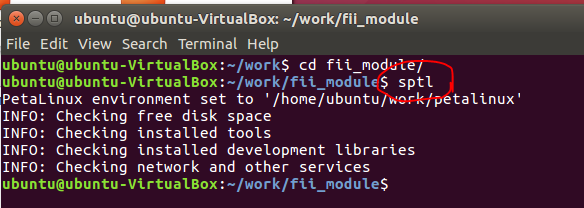
执行sptl
petalinux-config –get-hw-description ~/work/FII_7030.sdk/
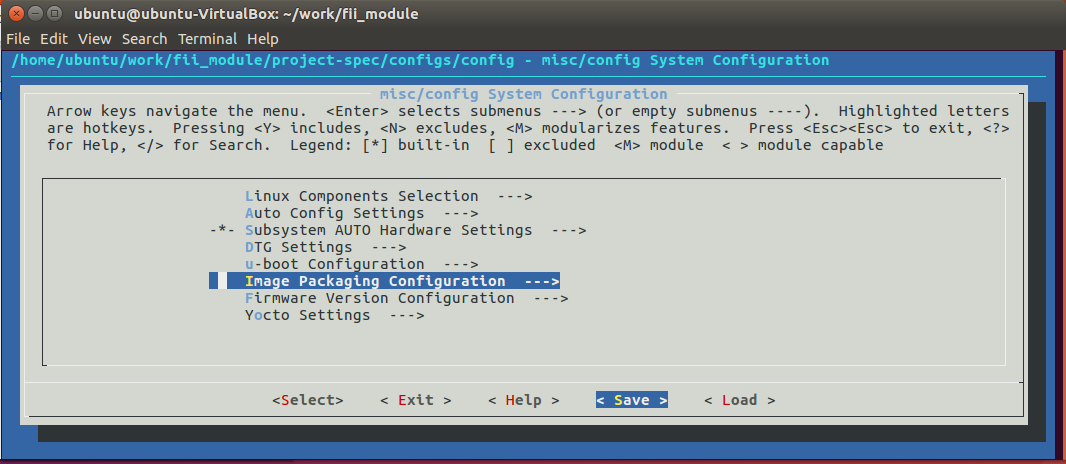
保存, 退出
- 添加创建fpga 自建驱动程序:
petalinux-create -t modules –name fii-driver
- 编辑 自建驱动程序:
进入~/work/fii_module/project-spec/meta-user/recipes-modules/fii-driver/files 目录
- 编辑 fii-driver.c 文件
如下:
/**********************************************************************************************/
#include <linux/kernel.h>
#include <linux/module.h>
#include <linux/fs.h>
#include <linux/uaccess.h> /* for put_user */
#include <asm/errno.h>
#include <linux/io.h>
#include <linux/of.h>
#include <linux/of_device.h>
//#include <linix/of_platform.h>
/*
0x43c0_0000 + 4 = value
0x43c0_0000 + 8 = direction
*/
#define DEVICE_NAME “fii-module”
#define CLASS_NAME “fii-module_class”
static int major;
static struct class *swled_class;
static unsigned int *gpio_data;
static unsigned int *gpio_dir ;
static int swled_open(struct inode* node,struct file* filp){
unsigned int gpio_base = (0x43c00000);
gpio_data = ioremap(gpio_base,8);
if(gpio_data){
printk(“kernel: ioremap(0x%08x)=0x%08x \n”,gpio_base,gpio_data);
// printk(KERN_ERR “ioremap(0x%x)=0x%x \n”,gpio_base,gpio_data);
}
else{
return -EINVAL;
}
gpio_dir = gpio_data + 1;
// *gpio_dir = (0x43c00000);
printk(“kernel: gpio_data address = 0x%08x \n”, gpio_data);
printk(“kernel: gpio_dir address = 0x%08x \n”, gpio_dir);
return 0;
}
int swled_release(struct inode *inode, struct file *filp)
{
// MOD_DEC_USE_COUNT;
iounmap(gpio_data);
return 0;
}
/*
0x43c0_0000 + 4 = value
0x43c0_0000 + 8 = direction
*/
static ssize_t swled_read(struct file *filp, char *buf, size_t size, loff_t *offset)
{
unsigned char val[32];
unsigned int temp;
unsigned int *addr_p;
int i = 0, cnt;
printk(“kernel: swled_read start…. size = %d\n”, size);
// cnt = size – 1;
cnt = size;
addr_p = gpio_data;
temp = *addr_p ;
for(i = 0; i < cnt/4; i++ )
{
val[i*4 + 3] = temp & 0xff;
val[i*4 + 2] = (temp >> 8) & 0xff;
val[i*4 + 1] = (temp >> 16) & 0xff;
val[i*4 + 0] = (temp >> 24) & 0xff;
addr_p ++;
temp = *addr_p;
}
if(i % 4 == 1)
{
val[i*4 + 0] = temp & 0xff;
}
if(i % 4 == 2)
{
val[i*4 + 1] = temp & 0xff;
val[i*4 + 0] = (temp >> 8) & 0xff;
}
if(i % 4 == 3)
{
val[i*4 + 2] = temp & 0xff;
val[i*4 + 1] = (temp >> 8) & 0xff;
val[i*4 + 0] = (temp >> 16) & 0xff;
}
copy_to_user(buf, val, cnt);
// printk(“val[0] = 0x%x, val[1] = 0x%x, val[2] = 0x%x, val[3] = 0x%x \n”,
// val[0], val[1], val[2], val[3]);
return cnt;
// return size;
}
static ssize_t swled_write(struct file * filp, const char __user *buf, size_t size, loff_t * offset) {
unsigned char val[32];
unsigned int temp = 0;
unsigned int * addr_p;
int i,cnt;
memset(val,0,32);
addr_p = gpio_data;
printk(“kernel: swled_write start…. size = %d\n”, size);
copy_from_user(&val, buf, size);
cnt = size – 1;
printk(“kernel: val[0] = 0x%08x \n”, val[0]);
if(val[0] == ‘w’)
{
temp = val[2];
temp = temp << 8 | val[3];
temp = temp << 8 | val[4];
temp = temp << 8 | val[5];
*addr_p = temp;
printk(“kernel: gpio_data = 0x%08x \n”, temp);
}
else if(val[0] == ‘d’)
{
addr_p ++;
temp = val[2];
temp = temp << 8 | val[3];
temp = temp << 8 | val[4];
temp = temp << 8 | val[5];
*addr_p = temp;
printk(“kernel: gpio_dir = 0x%08x \n”, temp);
}
else
{
printk(“kernel: invalid parameter \n”);
}
#if 0
temp = val[0] & 0xff;
temp = temp << 8 | (val[1] & 0xff);
temp = temp << 8 | (val[2] & 0xff);
temp = temp << 8 | (val[3] & 0xff);
printk(“val[0] = 0x%x, val[1] = 0x%x, val[2] = 0x%x, val[3] = 0x%x \n”,
val[0], val[1], val[2], val[3]);
*gpio_data = temp;
printk(“gpio_data = 0x%08x \n”, temp);
for(i = 0; i < cnt/4; i++)
{
temp = val[i*4 + 0];
temp = temp << 8 | val[i*4 + 1];
temp = temp << 8 | val[i*4 + 2];
temp = temp << 8 | val[i*4 + 3];
*addr_p = temp;
addr_p ++;
printk(“kernel: gpio_data[%d] = 0x%08x \n”, i, temp);
}
if(cnt %4 == 1)
{
temp = val[i*4 + 0];
*addr_p = temp;
printk(“kernel: gpio_data[%d] = 0x%08x \n”, i, temp);
}
if(cnt %4 == 2)
{
temp = val[i*4 + 0];
temp = temp << 8 | val[i*4 + 1];
*addr_p = temp;
printk(“kernel: gpio_data[%d] = 0x%08x \n”, i, temp);
}
if(cnt %4 == 3)
{
temp = val[i*4 + 0];
temp = temp << 8 | val[i*4 + 1];
temp = temp << 8 | val[i*4 + 2];
*addr_p = temp;
printk(“kernel: gpio_data[%d] = 0x%08x \n”, i, temp);
}
#endif
return size;
}
static struct file_operations swled_oprs = {
.owner = THIS_MODULE,
.open = swled_open,
.write = swled_write,
.read = swled_read,
.release= swled_release,
};
static int swled_init(void){ /* register device */
/*
*
* int register_chrdev (unsigned int major,
* const char *name,
* struct file_operations*fops);
*
* major => 0, automatic mode; others major device ID
*/
major=register_chrdev(0, DEVICE_NAME, &swled_oprs);
if (major < 0) {
printk (“Registering the character device failed with %d\n”, major);
return major;
}
swled_class = class_create(THIS_MODULE, CLASS_NAME);
device_create(swled_class, NULL, MKDEV(major,0), NULL, DEVICE_NAME);
return 0;
}
static void swled_exit(void){
unregister_chrdev(major, DEVICE_NAME);
device_destroy(swled_class,MKDEV(major,0));
class_destroy(swled_class);
};
module_init(swled_init);
module_exit(swled_exit);
MODULE_LICENSE(“GPL”);
/**********************************************************************************************/
- 添加petalinux 驱动选项:
petalinux-config -c rootfs
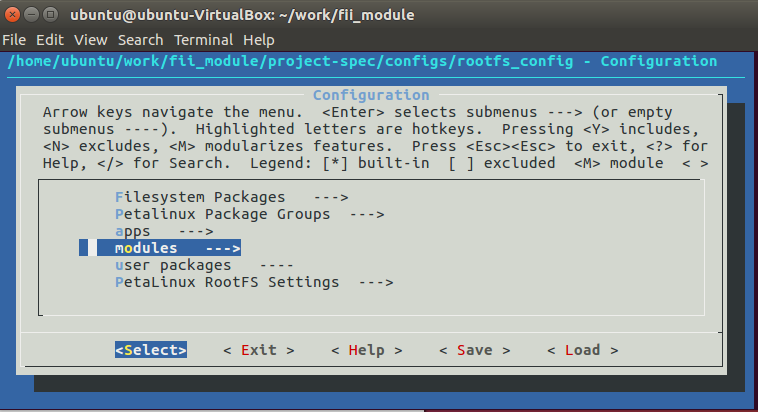
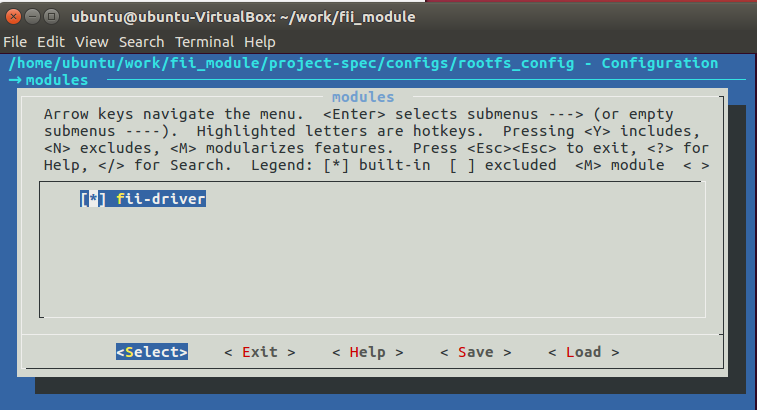
保存,退出
- 编译内核
petalinux-build -c kernel
- 编译驱动
petalinux-build -c fii-driver
- 编译整个工程:
petalinux-build
- 制作工程文件
petalinux-package –boot –fsbl ./images/linux/zynq_fsbl.elf –fpga –u-boot –force
- Copy (~/work/fii_module/images/linux/ 目录下的文件)BIN , image.ub 到SD卡上
- Copy 当前工程下的(~/work/fii_module/build/tmp/sysroots-components/plnx_zynq7/fii-driver/lib/modules/4.14.0-xilinx-v2018.2/extra/*.ko) 文件 到sd 卡上
- 将sd卡插入到fii_7030开发板,启动fii_7030 开发板
- 打开windows下的串口终端软件 , 配置串口为115200 波特率
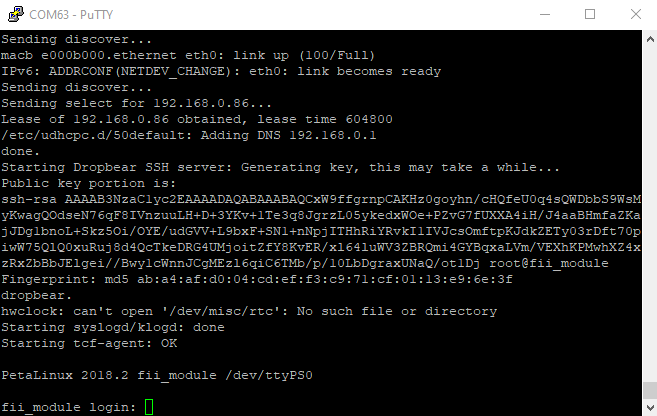
用户名root, 密码 root
- 在串口终端上执行调试命令
cd /mnt
mkdir sd_0
mount /dev/mmcblk0p1 /mnt/sd_0
cd /mnt/sd_0
执行 insmod fii-driver.ko
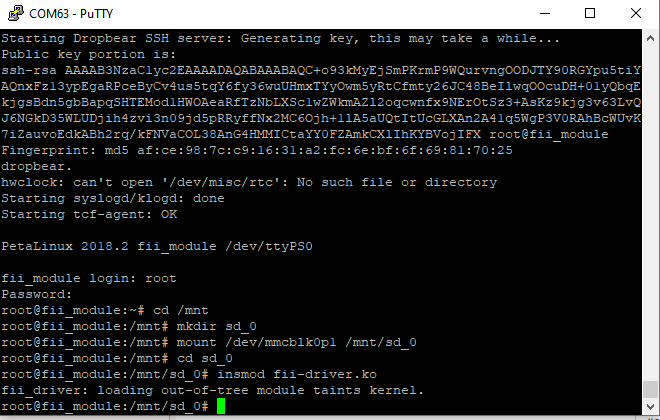
可以查看一下 /dev 目录下是否已经加载了fii-module 驱动
ls -l /dev/fii-module
如果存在, 说明驱动加载成功。
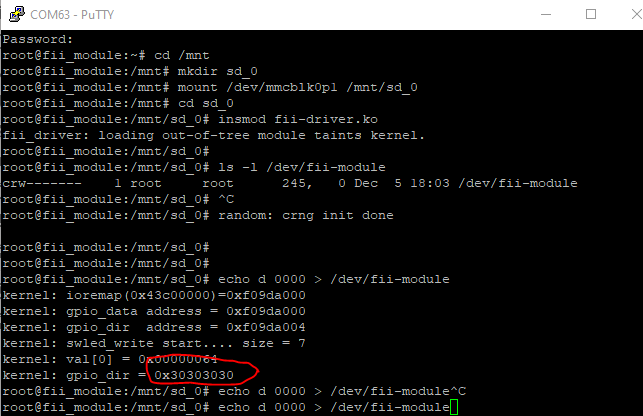
- 设置方向寄存器
0x4300_0000 = 0 (output); 0x4300_0000 = 1 (最低位 input,其他位是 output);
echo d 0000 > /dev/fii-module
- 设置gpio 口, 点亮led 灯
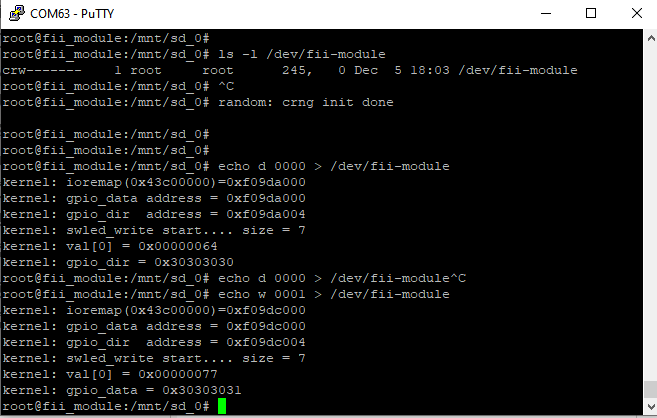
至此, linux 就可以通过系统命令,设置 gpio(led)了
- Linux 下,应用程序开发
在ubuntu 下创建一个test_func目录, 在test_func 目录下创建fii_app.c 文件
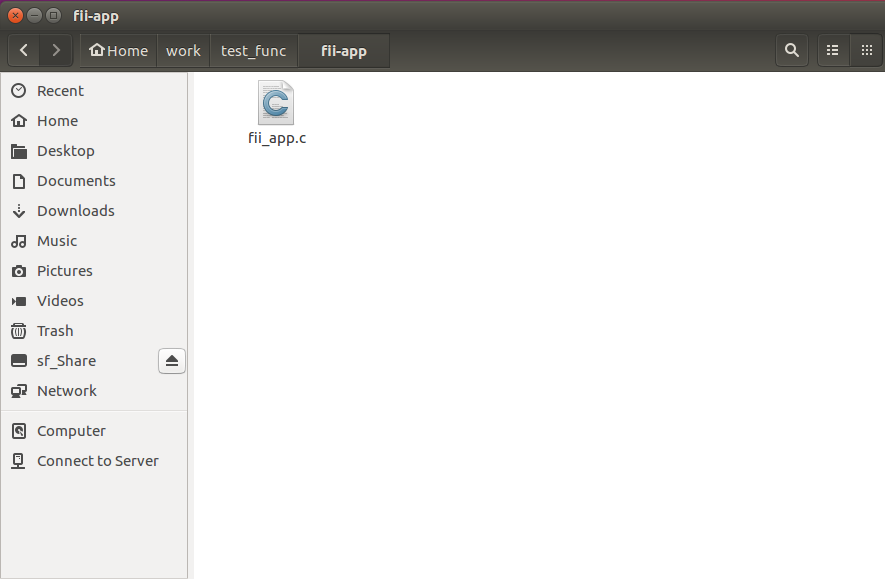
- 编辑c文件
/**********************************************************************************************/
#include <stdio.h>
#include <stdlib.h>
#include <fcntl.h> /* File Control Definitions */
#include <termios.h> /* POSIX Terminal Control Definitions */
#include <unistd.h> /* UNIX Standard Definitions */
#include <errno.h> /* ERROR Number Definitions */
#include <string.h>
// Number of strings in array argv
//int main( int argc, char *argv[],
//void main(void)
static void print_msg(void)
{
printf(“=============================================================\n”);
printf(“Usage :\n”);
printf(“./fii_app.o dir <val> : val : 0 => output; 1 => input\n”);
printf(“./fii_app.o wr <val> : val : 0x43c0_0004 address value\n”);
printf(“./fii_app.o rd : \n”);
printf(“=============================================================\n”);
return;
}
static void func_read(int fd, int read_cnt)
{
char rd_buf[32]; /* Buffer to store the data received */
int bytes_read = 0; /* Number of bytes read by the read() system call */
unsigned int temp;
printf(“Press ctrl+C to exit \n”);
tcflush(fd, TCIFLUSH); /* Discards old data in the rx buffer */
lseek(fd, 0, SEEK_SET);
bytes_read = read(fd, rd_buf, read_cnt);
printf(“\n\nBytes Rxed = %d \n”, bytes_read); /* Print the number of bytes read */
temp = rd_buf[0];
temp = (temp << 8) | rd_buf[1];
temp = (temp << 8) | rd_buf[2];
temp = (temp << 8) | rd_buf[3];
printf(“read value = 0x%08x \n”, temp);
temp = rd_buf[4];
temp = (temp << 8) | rd_buf[5];
temp = (temp << 8) | rd_buf[6];
temp = (temp << 8) | rd_buf[7];
printf(“read dir = 0x%08x \n”, temp);
printf(“\n +———————————-+\n\n\n”);
// usleep(1000000);
return;
}
static void func_write(int fd, char *p)
{
char wr_buf[32];
ssize_t bytes_written = 0;
unsigned int value;
memset (wr_buf, 0x0a, 32);
value = atoi(p);
printf(“value = %x \n” , value);
wr_buf[0] = ‘w’;
wr_buf[1] = ‘ ‘;
wr_buf[2] = value >> 24;
wr_buf[3] = (value >> 16) & 0xff;
wr_buf[4] = (value >> 8) & 0xff;
wr_buf[5] = value & 0xff;
bytes_written = write(fd, wr_buf, 7);
return;
}
static void func_direction(int fd, char *p)
{
char wr_buf[32];
ssize_t bytes_written = 0;
unsigned int value;
memset (wr_buf, 0x0a, 32);
value = atoi(p);
printf(“value = %x \n” , value);
wr_buf[0] = ‘d’;
wr_buf[1] = ‘ ‘;
wr_buf[2] = value >> 24;
wr_buf[3] = (value >> 16) & 0xff;
wr_buf[3] = (value >> 8) & 0xff;
wr_buf[5] = value & 0xff;
bytes_written = write(fd, wr_buf, 7);
}
int main( int argc, char *argv[])
{
int fd;/*File Descriptor*/
unsigned int value = 0;
char * cmd_p;
/* O_RDWR – Read/Write access to serial port */
/* O_RDONLY – Read access to serial port */
/* O_WRONLY – Write access to serial port */
/* O_NOCTTY – No terminal will control the process */
/* Open in blocking mode,read will wait */
fd = open(“/dev/fii-module”,O_RDWR );
printf(“\n +———————————-+”);
printf(“\n | fii-driver function |”);
printf(“\n +———————————-+”);
if(fd == -1) /* Error Checking */
printf(“\n Error! in Opening swled \n”);
else
printf(“\n fii-driver Opened Successfully \n”);
cmd_p = argv[1];
if(argc == 2)
{
if( strcmp (cmd_p , “rd”) == 0 )
{
func_read(fd, 8);
return 0;
}
else
{
print_msg();
close(fd); /* Close the serial port */
return 1;
}
}
else if (argc == 3)
{
if( strcmp (cmd_p , “wr”) == 0 )
{
func_write(fd, argv[2]);
close(fd); /* Close the serial port */
return 0;
}
else if( strcmp (cmd_p , “dir”) == 0 )
{
func_direction(fd, argv[2]);
close(fd); /* Close the serial port */
return 0;
}
}
else
{
print_msg();
close(fd); /* Close the serial port */
return 1;
}
return 0;
}
/**********************************************************************************************/
- c 编译
进入fii_app工程目录
sptl
arm-linux-gnueabihf-gcc fii_app.c -o fii_app.o
生成fii_app.o 文件
COPY fii_app.o 文件到 sd 卡上
- 加载fii-driver.ko, 执行sd 卡上上的 fii-driver.ko文件
insmod fii-driver.ko
- 运行fii_app 软件
在串口终端中执行, ./fii_app.o, 可以看到这个程序的使用指南
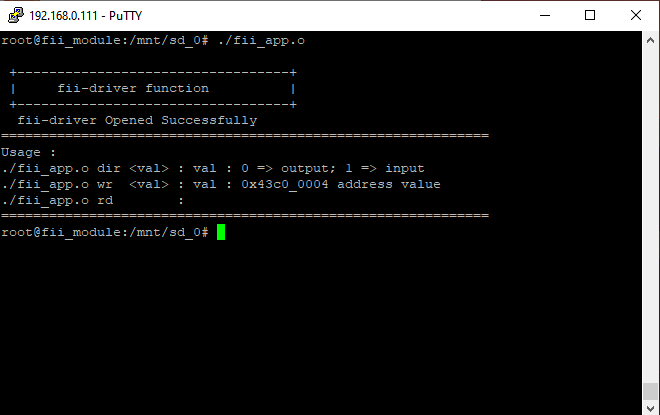
可根据上述命令选择: 方向寄存器,写操作, 读操作。
- 举例:
./fii_app.o dir 0 设置所有gpio 为 output
./fii_app.o wr 0 设置最低位gpio 为 0
./fii_app.o wr 7 设置最低三位gpio 为 0
./fii_app.o dir 7 设置低三位gpio 为 input
./fii_app.o rd 读取gpio 的值, (用户可以波动switch,查看gpio 状态)
简单字符设备驱动程序,设计完成。