在学习本节课之前需要一些预备知识:文章Verilog文件操作练习(1)BMP图像色彩替换中简单的介绍了BMP文件的格式,以及在文章图像色彩空间转换中学习RGB和YUV色彩空间的概念,在文章verilog 仿真工程应用-生成coe/mif 文件中学习如何通过文本文件或是二进制文件生成可以存储在RAM/ROM IP核中的coe/mif文件。本节课在使用BMP图像生成coe/mif文件的同时也练习使用了前面学过的Verilog文件操作等函数。结合以上的内容,就可以将一张BMP图像的RGB数据提取出来,经过YUV变换(可选),以相应的格式生成coe/mif文件,最终存储在FPGA的RAM/ROM IP核中,实验结构框图如下所示:

图1 实验结构
1. 从BMP图像中提取RGB纯数据
为了简化实验过程,突出实验目的,这里提供的BMP图像都是默认采用RGB24,并且宽度是4的整数倍(DWORD),不用padding。将RGB纯数据提取出来的Verilog代码如下图所示:
`timescale 1ns / 1ps


module bmp_1(
    );

//original bmp file
localparam FILE_TXT = "D:/Files_import/2022/test.bmp";

localparam WIDTH_PARAM = 1920;
localparam HEIGHT_PARAM = 1080;

integer fpre;//file

integer ret;//param for $fseek
integer num;//param for $fread, $fscanf

reg[7:0]fbyte[3:0];//storing $fread reg
reg[7:0] fbyte0,fbyte1,fbyte2;

integer i = 0;//used for loop param
integer j = 0;//used for loop param

reg [31:0] image_width;//param for counting image width
reg [31:0] image_height;//param for counting image height

//建立了一个1920*1080的装24-bit RGB像素数据的矩阵
reg[23:0]rgb_byte [HEIGHT_PARAM-1 : 0][WIDTH_PARAM-1 :0];


initial
begin

    fpre = $fopen(FILE_TXT, "rb"); //binary read
    if(fpre == 0)
        begin
            $display("$open file failed") ;
            $stop;
        end
        $display("\n ============= file opened... ============= ") ;

    ret = $fseek(fpre, 8'h12,0);//read from the start, offset set to image width and height

    num = $fread(fbyte,fpre,0,4);
    image_width = {fbyte[3],fbyte[2],fbyte[1],fbyte[0]};
    $display ("The image wdith is %d",image_width);
    #10;

    num = $fread(fbyte,fpre,0,4);
    image_height = {fbyte[3],fbyte[2],fbyte[1],fbyte[0]};
    $display ("The image height is %d",image_height);

    ret = $fseek(fpre, 8'h36,0);//read from the start, offset set to pixel array

    i = 0;
    j = 0;

    while($feof(fpre) != 1)
    begin
        num = $fscanf(fpre,"%c",fbyte0);
        num = $fscanf(fpre,"%c",fbyte1);
        num = $fscanf(fpre,"%c",fbyte2);

        if(j < image_height )
        begin
            if(i < image_width)
            begin
                rgb_byte[j][ i ] = {fbyte2,fbyte1,fbyte0}
                i = i + 1;
            end
            else
            begin
                j = j + 1;
                i = 0;
                rgb_byte[j][ i ] = {fbyte2,fbyte1,fbyte0}
                i = i + 1;
            end
        end

    end


    $fclose(fpre);
    $display("\n ============= file closed... ============= ") ;
    #100;
    $stop;

end
endmodule
2. 调整RGB数据格式
在前面介绍BMP格式的文章中有说过,BMP中像素的排列顺序是从左到右,从下到上的,而大部分图片,视频输出显示的排列顺序一般是从左到右,从上到下的,如下图所示的对比。所以本实验为了适应大部分应用程序还需要调整RGB的数据格式。

图2 左为BMP格式中像素排列的方向,右为大部分图片,视频的像素排列方向
调整上文程序中的1920*1080的装24-bit RGB像素数据的矩阵rgb_byte中的行顺序代码如下:
reg[23:0]rgb_ordered [HEIGHT_PARAM-1 : 0][WIDTH_PARAM-1 :0];
integer i;
integer j;

//这里只列出了颠倒RGB像素数据行顺序的部分代码

initial
begin
        i = 0;
    	j = 0;
    	for(j = 0; j <image_height; j = j + 1)
    	begin
    		for(i = 0; i <image_width; i = i + 1)
    			rgb_ordered[j][i] = rgb_byte[image_height -1 - j][i];
    	end
end
3. 变换RGB数据为YUV数据
文章图像色彩空间转换中详细说明了YUV色彩空间的概念,相比于RGB,YUV的优点是可以向下兼容黑白显示,以及根据人眼的视觉感知,调整图像的构成,使其便于后期压缩传输和还原。由YUV还可以扩展成YCbCr,YCbCr简单来说是在YUV的基础上做了偏移和缩放。RGB的构成是红色,绿色和蓝色分量组合,而YUV的构成是亮度(Y,Luminance)和色度(U和V,chrominance)。U表示蓝色投影,V表示红色投影。当U和V成分不存在时,Y单独可以输出到黑白电视上。
从RGB转换到YUV的公式如下所示,从公式中可以看出U和V成分是相对与Y成分的红,蓝投影(相对与Y来说,U和V不是告诉颜色有多少红/蓝,而是说明它比Y更红/蓝多少)。
- Y = 0.299R + 0.587G + 0.144B
- U = -0.147R – 0.289G + 0.436B = 0.492(B – Y)
- V = 0.615R – 0.515G – 0.100B = 0.877(R – Y)
注意:当RGB 取值范围在 0 — 255 之间时:
- Y 的范围: 0 — 255
- U的范围:-112 — +112
- V的范围:-157 — + 157
因为上述公式在实际转换过程中U,V的结果可能为负数,所以为了避免这种情况,将Y,U,V的范围都保证在[0, 255]内,一般会使用下列公式:
- Y = 0.257R + 0.504G + 0.098B + 16
- Cb = -0.148R – 0.291G + 0.439B + 128
- Cr = 0.439R – 0.368G – 0.071B + 128
YCbCr 与YUV的算法非常类似,这两者也经常会被混淆。 但YCbCr非常适合数值视频的存储(在YUV的基础上只是修改了矩阵的相关系数 + 偏移) 。 YCbCr 是ITU-R BT.601协议的一部分,在8-bit数字视频信号存储时:
- Y 的范围:16 — 235
- Cb(U)的范围:16 — 240
- Cr(V)的范围:16 — 240
在将RGB数据转换成YUV之后,这里同样颠倒了YUV数据的列顺序,实现的Verilog代码如下所示:
`timescale 1ns / 1ps


module bmp_1(
    );

//original bmp file
localparam FILE_TXT = "D:/Files_import/2022/test.bmp";

localparam WIDTH_PARAM = 1920;
localparam HEIGHT_PARAM = 1080;

integer fpre;//file

integer ret;//param for $fseek
integer num;//param for $fread, $fscanf

reg[7:0]fbyte[3:0];//storing $fread reg
reg[7:0] fbyte0,fbyte1,fbyte2;

integer i = 0;//used for loop param
integer j = 0;//used for loop param

reg [31:0] image_width;//param for counting image width
reg [31:0] image_height;//param for counting image height

reg[23:0]yuv_byte [HEIGHT_PARAM-1 : 0][WIDTH_PARAM-1 :0];
reg[23:0]yuv_ordered [HEIGHT_PARAM-1 : 0][WIDTH_PARAM-1 :0];

real y,Cb,Cr;

reg[7:0] y_byte,u_byte,v_byte;

initial
begin

    fpre = $fopen(FILE_TXT, "rb"); //binary read
    if(fpre == 0)
        begin
            $display("$open file failed") ;
            $stop;
        end
        $display("\n ============= file opened... ============= ") ;

    ret = $fseek(fpre, 8'h12,0);//read from the start, offset set to image width and height

    num = $fread(fbyte,fpre,0,4);
    image_width = {fbyte[3],fbyte[2],fbyte[1],fbyte[0]};
    $display ("The image wdith is %d",image_width);
    #10;

    num = $fread(fbyte,fpre,0,4);
    image_height = {fbyte[3],fbyte[2],fbyte[1],fbyte[0]};
    $display ("The image height is %d",image_height);

    ret = $fseek(fpre, 8'h36,0);//read from the start, offset set to pixel array

    i = 0;
    j = 0;

    while($feof(fpre) != 1)
    begin
        num = $fscanf(fpre,"%c",fbyte0);//****blue
        num = $fscanf(fpre,"%c",fbyte1);//greeen
        num = $fscanf(fpre,"%c",fbyte2);//****red

// *************** formula ******************
//    	  Y    =   0.257R + 0.504G  + 0.098B + 16
//        Cb  = -0.148R  - 0.291G  + 0.439B  + 128
//        Cr  =   0.439R  - 0.368G  - 0.071B  + 128


    y = 0.257*fbyte2 + 0.504*fbyte1 + 0.098*fbyte0 + 16;
    	Cb = -0.148*fbyte2 - 0.291*fbyte1 + 0.439*fbyte0 + 128;
    	Cr = 0.439*fbyte2 - 0.368*fbyte1 - 0.071*fbyte0 + 128 ;

//real number to integer number
    	y_byte =  $rtoi( y ) ;
    	u_byte =  $rtoi( Cb ) ;
    	v_byte =  $rtoi( Cr ) ;

        if(j < image_height)
        begin
            if(i < image_width)
            begin
                yuv_byte[j][ i ] = {y_byte,u_byte,v_byte};
                i = i + 1;
            end
            else
            begin
                j = j + 1;
                i = 0;
                yuv_byte[j][ i ] = {y_byte,u_byte,v_byte};
                i = i + 1;
            end
        end

    end

    i = 0;
    j = 0;
    for(j = 0; j <image_height; j = j + 1)
    begin
        for(i = 0; i <image_width; i = i + 1)
        yuv_ordered[j][i] = yuv_byte[image_height -1 - j][i];
    end

    $fclose(fpre);
    $display("\n ============= file closed... ============= ") ;

    #100;
    $stop;

end
endmodule
4. RGB/YUV数据生成coe/mif文件
对于在Verilog仿真工程中如何生成coe/mif文件,可以参考文章verilog 仿真工程应用-生成coe/mif 文件。这里在此基础上,将输入的input_data替换成RGB/YUV数据,实现的Verilog代码如下:
YUV数据生成coe文件:
`timescale 1ns / 1ps


module bmp_1(
    );

//original bmp file
localparam FILE_TXT = "D:/Files_import/2022/0207/test4.bmp";

// coe file
localparam FILE_COE = "D:/Files_import/2022/0207/coe_test.coe";
localparam  INPUT_DATA_RADIX    = 16;   // 16,  10 , 2


localparam WIDTH_PARAM = 1920;
localparam HEIGHT_PARAM = 1080;

integer fpre;//file
integer fcoe;

integer ret;//param for $fseek
integer num;//param for $fread, $fscanf

reg[7:0]fbyte[3:0];//storing $fread reg
reg[7:0] fbyte0,fbyte1,fbyte2;

integer i = 0;//used for loop param
integer j = 0;//used for loop param

reg [31:0] image_width;//param for counting image width
reg [31:0] image_height;//param for counting image height

reg[23:0]yuv_byte [HEIGHT_PARAM-1 : 0][WIDTH_PARAM-1 :0];
reg[23:0]yuv_ordered [HEIGHT_PARAM-1 : 0][WIDTH_PARAM-1 :0];

real y,Cb,Cr;

reg[7:0] y_byte,u_byte,v_byte;

initial
begin

    fpre = $fopen(FILE_TXT, "rb"); //binary read
    if(fpre == 0)
        begin
            $display("$open file failed") ;
            $stop;
        end
        $display("\n ============= file opened... ============= ") ;

    ret = $fseek(fpre, 8'h12,0);//read from the start, offset set to image width and height

    num = $fread(fbyte,fpre,0,4);
    image_width = {fbyte[3],fbyte[2],fbyte[1],fbyte[0]};
    $display ("The image wdith is %d",image_width);
    #10;

    num = $fread(fbyte,fpre,0,4);
    image_height = {fbyte[3],fbyte[2],fbyte[1],fbyte[0]};
    $display ("The image height is %d",image_height);

    ret = $fseek(fpre, 8'h36,0);//read from the start, offset set to pixel array

    i = 0;
    j = 0;

    while($feof(fpre) != 1)
    begin
        num = $fscanf(fpre,"%c",fbyte0);//****blue
        num = $fscanf(fpre,"%c",fbyte1);//greeen
        num = $fscanf(fpre,"%c",fbyte2);//****red

//=================== formula ======================
//    	  Y    =   0.257R + 0.504G  + 0.098B + 16
//        Cb  = -0.148R  - 0.291G  + 0.439B  + 128
//        Cr  =   0.439R  - 0.368G  - 0.071B  + 128
//==================================================

    y = 0.257*fbyte2 + 0.504*fbyte1 + 0.098*fbyte0 + 16;
    	Cb = -0.148*fbyte2 - 0.291*fbyte1 + 0.439*fbyte0 + 128;
    	Cr = 0.439*fbyte2 - 0.368*fbyte1 - 0.071*fbyte0 + 128 ;

    	y_byte =  $rtoi( y ) ;
    	u_byte =  $rtoi( Cb ) ;
    	v_byte =  $rtoi( Cr ) ;

        if(j < image_height)
        begin
            if(i < image_width)
            begin
                yuv_byte[j][ i ] = {y_byte,u_byte,v_byte};
                i = i + 1;
            end
            else
            begin
                j = j + 1;
                i = 0;
                yuv_byte[j][ i ] = {y_byte,u_byte,v_byte};
                i = i + 1;
            end
        end

    end

    i = 0;
    j = 0;
    for(j = 0; j <image_height; j = j + 1)
    begin
        for(i = 0; i <image_width; i = i + 1)
            yuv_ordered[j][i] = yuv_byte[image_height -1 - j][i];
    end

    $fclose(fpre);
    $display("\n ============= file closed... ============= ") ;


//=============================== write coe file ===============================
    i = 0;
    j = 0;
    fcoe = $fopen(FILE_COE, "w");
    if(fcoe == 0)
    begin
        $display("$open coe file failed") ;
        $stop;
    end


    $display("\n ============= coe file opened... ============= ") ;
// coe file
    $fwrite(fcoe,"memory_initialization_radix = %0d;\n",INPUT_DATA_RADIX);
    $fwrite(fcoe,"memory_initialization_vector = ");
    #10;

    for(j = 0; j <image_height; j = j + 1)
    begin
        for(i = 0; i <image_width; i = i + 1)
            if( INPUT_DATA_RADIX == 16)
                $fwrite(fcoe,"\n%h", yuv_ordered[j][i]);
            if( INPUT_DATA_RADIX == 2)
                $fwrite(fcoe,"\n%b",yuv_ordered[j][i]);
            if( INPUT_DATA_RADIX == 10)
                $fwrite(fcoe,"\n%d", yuv_ordered[j][i]);
                #10;
    end
    $fwrite(fcoe,";");
    #10;
    $fclose(fcoe) ;
    $display("\n ============= coe file closed... ============= ") ;
// =====================================================================

    #100;
    $stop;

end
endmodule
YUV数据生成mif文件:
`timescale 1ns / 1ps


module bmp_1(
    );

//original bmp file
localparam FILE_TXT = "D:/Files_import/2022/0207/test4.bmp";

localparam  INPUT_DATA_RADIX    = 16;   // 16,  10 , 2

// mif file
localparam FILE_MIF = "D:/Files_import/2022/0207/mif_test.mif";

localparam WIDTH_PARAM = 1920;
localparam HEIGHT_PARAM = 1080;

integer fpre;//file
integer fmif;

integer ret;//param for $fseek
integer num;//param for $fread, $fscanf

reg[7:0]fbyte[3:0];//storing $fread reg
reg[7:0] fbyte0,fbyte1,fbyte2;

integer i = 0;//used for loop param
integer j = 0;//used for loop param

reg [31:0] image_width;//param for counting image width
reg [31:0] image_height;//param for counting image height

reg[23:0]rgb_byte [HEIGHT_PARAM-1 : 0][WIDTH_PARAM-1 :0];
reg[23:0]rgb_ordered [HEIGHT_PARAM-1 : 0][WIDTH_PARAM-1 :0];
reg[23:0]yuv_byte [HEIGHT_PARAM-1 : 0][WIDTH_PARAM-1 :0];
reg[23:0]yuv_ordered [HEIGHT_PARAM-1 : 0][WIDTH_PARAM-1 :0];

real y,Cb,Cr;

reg[7:0] y_byte,u_byte,v_byte;

initial
begin

    fpre = $fopen(FILE_TXT, "rb"); //binary read
    if(fpre == 0)
        begin
            $display("$open file failed") ;
            $stop;
        end
        $display("\n ============= file opened... ============= ") ;

    ret = $fseek(fpre, 8'h12,0);//read from the start, offset set to image width and height

    num = $fread(fbyte,fpre,0,4);
    image_width = {fbyte[3],fbyte[2],fbyte[1],fbyte[0]};
    $display ("The image wdith is %d",image_width);
    #10;

    num = $fread(fbyte,fpre,0,4);
    image_height = {fbyte[3],fbyte[2],fbyte[1],fbyte[0]};
    $display ("The image height is %d",image_height);

    ret = $fseek(fpre, 8'h36,0);//read from the start, offset set to pixel array

    i = 0;
    j = 0;

    while($feof(fpre) != 1)
    begin
        num = $fscanf(fpre,"%c",fbyte0);//****blue
        num = $fscanf(fpre,"%c",fbyte1);//greeen
        num = $fscanf(fpre,"%c",fbyte2);//****red

//****************** formula ***********************
//    	  Y    =   0.257R + 0.504G  + 0.098B + 16
//        Cb  = -0.148R  - 0.291G  + 0.439B  + 128
//        Cr  =   0.439R  - 0.368G  - 0.071B  + 128


    y = 0.257*fbyte2 + 0.504*fbyte1 + 0.098*fbyte0 + 16;
    	Cb = -0.148*fbyte2 - 0.291*fbyte1 + 0.439*fbyte0 + 128;
    	Cr = 0.439*fbyte2 - 0.368*fbyte1 - 0.071*fbyte0 + 128 ;

    	y_byte =  $rtoi( y ) ;
    	u_byte =  $rtoi( Cb ) ;
    	v_byte =  $rtoi( Cr ) ;


        if(j < image_height)
        begin
            if(i < image_width)
            begin
                yuv_byte[j][ i ] = {y_byte,u_byte,v_byte};
                i = i + 1;
            end
            else
            begin
                j = j + 1;
                i = 0;
                yuv_byte[j][ i ] = {y_byte,u_byte,v_byte};
                i = i + 1;
            end
        end

    end

    i = 0;
    j = 0;
    for(j = 0; j <image_height; j = j + 1)
    begin
        for(i = 0; i <image_width; i = i + 1)
            yuv_ordered[j][i] = yuv_byte[image_height -1 - j][i];
    end


    $fclose(fpre);
    $display("\n ============= file closed... ============= ") ;


// =====================================================================
// mif file
   i = 0;
   j = 0;
    $display("\n ============= mif file opened... ============= ") ;
    fmif = $fopen(FILE_MIF, "w");
    if(fmif == 0)
    begin
        $display("$open mif file failed") ;
        $stop;
    end

    $fwrite(fmif,"WIDTH=%0d;\n",24);//YUV data in 24-bits
    $fwrite(fmif,"DEPTH=%0d;\n\n",image_height*image_width);

    $fwrite(fmif,"ADDRESS_RADIX=UNS;\n");
    if( INPUT_DATA_RADIX == 16)
        $fwrite(fmif,"DATA_RADIX=HEX;\n\n");
    if( INPUT_DATA_RADIX == 10)
        $fwrite(fmif,"DATA_RADIX=DEC;\n\n");
    if( INPUT_DATA_RADIX == 2)
        $fwrite(fmif,"DATA_RADIX=BIN;\n\n");

    $fwrite(fmif,"CONTENT BEGIN\n");
    #10;

    for(j = 0; j <image_height; j = j + 1)
    begin
        for(i = 0; i <image_width; i = i + 1)
            if( INPUT_DATA_RADIX == 16)
                $fwrite(fmif,"\n%h", yuv_ordered[j][i]);
            if( INPUT_DATA_RADIX == 2)
                $fwrite(fmif,"\n%b",yuv_ordered[j][i]);
            if( INPUT_DATA_RADIX == 10)
                $fwrite(fmif,"\n%d", yuv_ordered[j][i]);
                #10;
    end

    $fwrite(fmif,"END;\n");
    #10;

    $fclose(fmif) ;
    $display("\n ============= mif file closed... ============= ") ;
// =====================================================================
    #100;
    $stop;

end
endmodule
RGB数据生成coe文件:
`timescale 1ns / 1ps


module bmp_1(
    );

//original bmp file
localparam FILE_TXT = "D:/Files_import/2022/0207/test4.bmp";

// coe file
localparam FILE_COE = "D:/Files_import/2022/0207/coe_test.coe";
localparam  INPUT_DATA_RADIX    = 16;   // 16,  10 , 2


localparam WIDTH_PARAM = 1920;
localparam HEIGHT_PARAM = 1080;

integer fpre;//file
integer fcoe;


integer ret;//param for $fseek
integer num;//param for $fread, $fscanf

reg[7:0]fbyte[3:0];//storing $fread reg
reg[7:0] fbyte0,fbyte1,fbyte2;

integer i = 0;//used for loop param
integer j = 0;//used for loop param

reg [31:0] image_width;//param for counting image width
reg [31:0] image_height;//param for counting image height

reg[23:0]rgb_byte [HEIGHT_PARAM-1 : 0][WIDTH_PARAM-1 :0];
reg[23:0]rgb_ordered [HEIGHT_PARAM-1 : 0][WIDTH_PARAM-1 :0];


initial
begin

    fpre = $fopen(FILE_TXT, "rb"); //binary read
    if(fpre == 0)
        begin
            $display("$open file failed") ;
            $stop;
        end
        $display("\n ============= file opened... ============= ") ;

    ret = $fseek(fpre, 8'h12,0);//read from the start, offset set to image width and height

    num = $fread(fbyte,fpre,0,4);
    image_width = {fbyte[3],fbyte[2],fbyte[1],fbyte[0]};
    $display ("The image wdith is %d",image_width);
    #10;

    num = $fread(fbyte,fpre,0,4);
    image_height = {fbyte[3],fbyte[2],fbyte[1],fbyte[0]};
    $display ("The image height is %d",image_height);

    ret = $fseek(fpre, 8'h36,0);//read from the start, offset set to pixel array

    i = 0;
    j = 0;


    while($feof(fpre) != 1)
    begin
        num = $fscanf(fpre,"%c",fbyte0);
        num = $fscanf(fpre,"%c",fbyte1);
        num = $fscanf(fpre,"%c",fbyte2);

        if(j < image_height )
        begin
            if(i < image_width)
            begin
                rgb_byte[j][ i ] = {fbyte2,fbyte1,fbyte0}
                i = i + 1;
            end
            else
            begin
                j = j + 1;
                i = 0;
                rgb_byte[j][ i ] = {fbyte2,fbyte1,fbyte0}
                i = i + 1;
            end
        end

    end

    i = 0;
    j = 0;
    for(j = 0; j <image_height; j = j + 1)
    begin
        for(i = 0; i <image_width; i = i + 1)
            //yuv_ordered[j][i] = yuv_byte[image_height -1 - j][i];
            rgb_ordered[j][i] = rgb_byte[image_height -1 - j][i];
    end


    $fclose(fpre);
    $display("\n ============= file closed... ============= ") ;


//=============================== write coe file ===============================
    i = 0;
    j = 0;
    fcoe = $fopen(FILE_COE, "w");
    if(fcoe == 0)
    begin
        $display("$open coe file failed") ;
        $stop;
    end


    $display("\n ============= coe file opened... ============= ") ;
// coe file
    $fwrite(fcoe,"memory_initialization_radix = %0d;\n",INPUT_DATA_RADIX);
    $fwrite(fcoe,"memory_initialization_vector = ");
    #10;

    for(j = 0; j <image_height; j = j + 1)
    begin
        for(i = 0; i <image_width; i = i + 1)
            if( INPUT_DATA_RADIX == 16)
                $fwrite(fcoe,"\n%h", rgb_ordered[j][i]);
            if( INPUT_DATA_RADIX == 2)
                $fwrite(fcoe,"\n%b",rgb_ordered[j][i]);
            if( INPUT_DATA_RADIX == 10)
                $fwrite(fcoe,"\n%d", rgb_ordered[j][i]);
                #10;
    end
    $fwrite(fcoe,";");
    #10;
    $fclose(fcoe) ;
    $display("\n ============= coe file closed... ============= ") ;
// =====================================================================


    #100;
    $stop;

end
endmodule
RGB数据生成mif文件:
`timescale 1ns / 1ps


module bmp_1(
    );

//original bmp file
localparam FILE_TXT = "D:/Files_import/2022/0207/test4.bmp";


localparam  INPUT_DATA_RADIX    = 16;   // 16,  10 , 2

// mif file
localparam FILE_MIF = "D:/Files_import/2022/0207/mif_test.mif";

localparam WIDTH_PARAM = 1920;
localparam HEIGHT_PARAM = 1080;

integer fpre;//file
integer fmif;

integer ret;//param for $fseek
integer num;//param for $fread, $fscanf

reg[7:0]fbyte[3:0];//storing $fread reg
reg[7:0] fbyte0,fbyte1,fbyte2;

integer i = 0;//used for loop param
integer j = 0;//used for loop param

reg [31:0] image_width;//param for counting image width
reg [31:0] image_height;//param for counting image height

reg[23:0]rgb_byte [HEIGHT_PARAM-1 : 0][WIDTH_PARAM-1 :0];
reg[23:0]rgb_ordered [HEIGHT_PARAM-1 : 0][WIDTH_PARAM-1 :0];


initial
begin

    fpre = $fopen(FILE_TXT, "rb"); //binary read
    if(fpre == 0)
        begin
            $display("$open file failed") ;
            $stop;
        end
        $display("\n ============= file opened... ============= ") ;

    ret = $fseek(fpre, 8'h12,0);//read from the start, offset set to image width and height

    num = $fread(fbyte,fpre,0,4);
    image_width = {fbyte[3],fbyte[2],fbyte[1],fbyte[0]};
    $display ("The image wdith is %d",image_width);
    #10;

    num = $fread(fbyte,fpre,0,4);
    image_height = {fbyte[3],fbyte[2],fbyte[1],fbyte[0]};
    $display ("The image height is %d",image_height);

    ret = $fseek(fpre, 8'h36,0);//read from the start, offset set to pixel array

    i = 0;
    j = 0;


    while($feof(fpre) != 1)
    begin
        num = $fscanf(fpre,"%c",fbyte0);
        num = $fscanf(fpre,"%c",fbyte1);
        num = $fscanf(fpre,"%c",fbyte2);

        if(j < image_height )
        begin
            if(i < image_width)
            begin
                rgb_byte[j][ i ] = {fbyte2,fbyte1,fbyte0}
                i = i + 1;
            end
            else
            begin
                j = j + 1;
                i = 0;
                rgb_byte[j][ i ] = {fbyte2,fbyte1,fbyte0}
                i = i + 1;
            end
        end
    end

    i = 0;
    j = 0;
    for(j = 0; j <image_height; j = j + 1)
    begin
        for(i = 0; i <image_width; i = i + 1)
            //yuv_ordered[j][i] = yuv_byte[image_height -1 - j][i];
            rgb_ordered[j][i] = rgb_byte[image_height -1 - j][i];
    end


    $fclose(fpre);

// =====================================================================
// mif file
   i = 0;
   j = 0;
    $display("\n ============= mif file opened... ============= ") ;
    fmif = $fopen(FILE_MIF, "w");
    if(fmif == 0)
    begin
        $display("$open mif file failed") ;
        $stop;
    end

    $fwrite(fmif,"WIDTH=%0d;\n",24);//YUV data in 24-bits
    $fwrite(fmif,"DEPTH=%0d;\n\n",image_height*image_width);

    $fwrite(fmif,"ADDRESS_RADIX=UNS;\n");
    if( INPUT_DATA_RADIX == 16)
        $fwrite(fmif,"DATA_RADIX=HEX;\n\n");
    if( INPUT_DATA_RADIX == 10)
        $fwrite(fmif,"DATA_RADIX=DEC;\n\n");
    if( INPUT_DATA_RADIX == 2)
        $fwrite(fmif,"DATA_RADIX=BIN;\n\n");

    $fwrite(fmif,"CONTENT BEGIN\n");
    #10;

    for(j = 0; j <image_height; j = j + 1)
    begin
        for(i = 0; i <image_width; i = i + 1)
            if( INPUT_DATA_RADIX == 16)
                $fwrite(fmif,"\n%h", rgb_ordered[j][i]);
            if( INPUT_DATA_RADIX == 2)
                $fwrite(fmif,"\n%b",rgb_ordered[j][i]);
            if( INPUT_DATA_RADIX == 10)
                $fwrite(fmif,"\n%d", rgb_ordered[j][i]);
                #10;
    end

    $fwrite(fmif,"END;\n");
    #10;

    $fclose(fmif) ;
    $display("\n ============= mif file closed... ============= ") ;
// =====================================================================
    #100;
    $stop;

end
endmodule
5.扩展
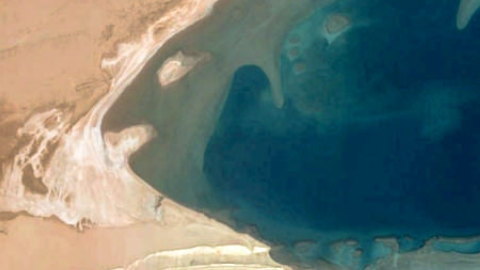
结合之前学习的HDMI图像显示,参见文章HDMI 图像显示 ,前面RGB数据生成的coe文件可以通过ADV7511图像显示工程在FII-PRX100-D FPGA开发板上跑起来,注意ADV7511图像显示工程中规定了图像的大小是480*270,实例将一张480*270的图像通过本文的RGB转coe文件工程,生成相应的coe文件,原图片和生成相应的coe文件如下:
[content_control]
[/content_control]
最后在屏幕上显示的效果如下:

图3 HDMI显示
从以上可知,使用Vivado仿真中的文件操作函数可以将一张图片转成coe文件,并通过HDMI显示在屏幕上。